Trading journal
How to Use the EdgeDojo Trading Journal
A practical guide to journaling in EdgeDojo: import trades, set stops and targets, log MAE and MFE, score setups, and grade each session.
Published · 13 min read
Step 1: Get your trades in
The more friction there is with entering trades, the less likely you are to maintain your journal. We make importing easy:
- Import from any broker. Open Import and upload the trade history file from your broker or exchange. EdgeDojo's universal smart import reads it, pairs your fills into whole trades, and lands them with P&L and fees calculated. Any broker, any asset class: stocks, ETFs, options, futures, perpetual futures, crypto, and forex all go into the same journal.
- Sync Hyperliquid natively. Perps traders skip the file entirely. Enter your wallet address and your fills pair into trades with fees included. More on the Hyperliquid integration.
- Add a trade by hand when you need to. The manual form takes the same fields as an import plus everything below.
Imports are safe to repeat. Fills you already have are skipped, and new fills on a trade that is still open are added to it, so a weekly full-history upload never double-counts or splits a position in two.
Step 2: Add what your broker does not know
A statement gives EdgeDojo the what. Everything that makes a journal useful is the why, and that takes about a minute per trade. Open a trade and fill in the following.
Stop loss and target
These are the two most important numbers you will enter, because they define the trade's risk and turn every result into an R-multiple.
- Stop loss is the price at which the idea is wrong. The distance from entry to stop, times your size, is your initial risk, or 1R.
- Target profit is the price you were aiming for when you took the trade.
With both set, EdgeDojo shows the trade's planned risk-to-reward ratio and, once it closes, the realized R multiple: profit or loss divided by initial risk. A trade that risked $100 and made $250 is +2.5R. A trade that lost exactly its stop is -1R.
R-multiples matter because they normalize risk and reward. A $400 win on a big position and a $400 win on a small position are not the same trade, and neither is comparable to a futures contract or a perp. In R, every trade you have ever taken sits on the same scale, which is what makes the R-multiple distribution on your dashboard readable.
MAE and MFE
Maximum Adverse Excursion (MAE) is the worst price the trade reached against you while it was open. Maximum Favorable Excursion (MFE) is the best price it reached in your favor. In EdgeDojo you enter the two prices, MAE Price and MFE Price, and the trade detail shows each as a percentage and, when a stop is set, in R.
These two numbers answer two very valuable questions:
- Are my stops too tight? Look at your winning trades' MAE. If most winners went -0.6R against you before working, a stop at -0.5R would have stopped you out of your own winners. If winners rarely exceed -0.3R, your stop can be tighter and your size larger for the same dollar risk, increasing your profit factor.
- Are my targets too far? Look at your losing trades' MFE. If your losers routinely reached +1R before reversing to hit the stop, the trade was offering you money you did not take. A closer target, or a rule to move the stop to breakeven at +1R, would convert some of those losers.
- Am I cutting winners early? Compare the realized R on winners to their MFE. If the average winner closed at +1.2R but reached +2.5R, you are leaving more than half of the available move on the table.
Did the target get hit?
There is a simple yes or no field for whether the trade reached your original target. It sounds redundant next to MFE, but it is the fastest process check you have. Over a sample of trades, the share that hit target versus the share that stopped out tells you whether your targets are realistic for the setup. A setup where 20 percent of trades reach target needs a target that is either closer or better justified.
Strategy and checklist
Every trade can be assigned to a strategy, and every strategy can carry a checklist of criteria that define a valid entry. Set these up under Strategies once. For a breakout setup, criteria might be "price breaks to 52w high" and "breakout day is on higher volume".
When you log a trade, tick the criteria that were true at entry. The trade records which ones were met and turns them into a setup score: the share of the strategy's checklist the trade satisfied. Three of four criteria checked is a 75 percent setup. The score appears as a badge on the trade, green at 75 percent and above, amber from 50 to 74, red below that, so when you review a loser you can see at a glance whether it was a valid setup that failed or a rule you broke.
The score is the honest version of the "A+ setup" tag. You define what an A+ is once, in the checklist, and every trade is graded against the same standard rather than against how you felt that morning. Over time, filtering the journal by strategy shows which setups pay, and the setup score chart in Analytics shows whether your full-checklist trades actually outperform the ones where you cut corners. If you are consistently losing on A+ setups, your strategy may not have as much edge as you think.
Tags and notes
Tags are free-form labels, comma separated, for anything you want to remember about the trade that a strategy or checklist does not capture: chased, news-fade, revenge, A+, late-entry. Mistakes are the most valuable tags. A trade you took for a bad reason should carry that reason.
Notes are a sentence or two of what you were thinking. Not a retrospective essay. The most useful note is the one written at entry: "shorting because the bounce stalled under VWAP, expect a retest of the low."
Screenshots
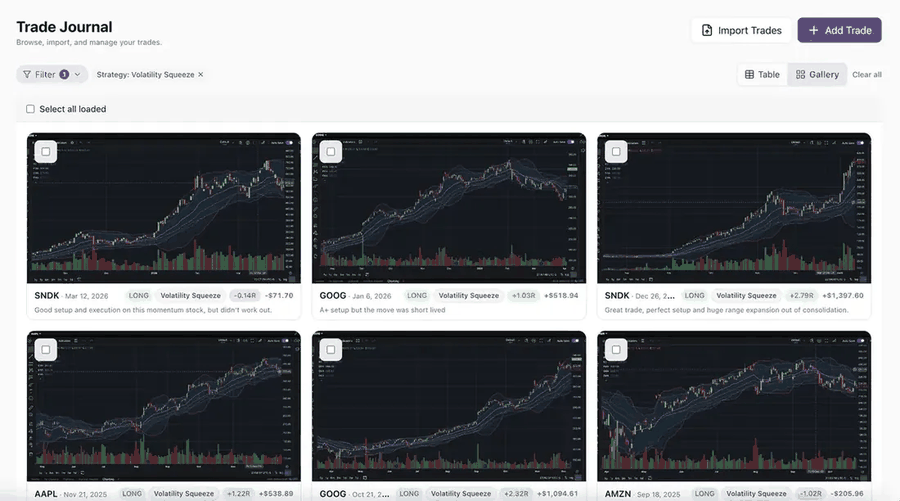
Attach the chart at entry and at exit, with a caption. Numbers tell you what happened; the picture tells you what you saw, which is often not the same thing. Your best trades in a gallery become a pattern library. Your worst trades in a gallery are how you learn to recognize the setup you keep falling for.
Step 3: Keep the daily diary
Trades measure your decisions. The diary measures the trader making them. It is one entry per day, split into a pre-market plan and an end-of-day review, and the only required field is the date, so you can save a partial entry and finish it later.
Before the open: Pre-Plan
Fill this in before you take a trade. Anchoring your intentions before the session is how you find out later whether you traded your plan or your emotions.
- Mood. A one to five rating of how you feel going in. This is your psychology score for the day. Be honest. A two after a bad night's sleep or an argument is exactly the data point that matters.
- Market conditions. Bullish, bearish, sideways, volatile, or calm.
- Fundamental catalysts. The events you are watching: earnings, data releases, a funding rate, a token unlock.
- Technicals. The levels that matter today.
- Expectations for the day. What you plan to do, and just as important, what you plan not to do.
After the close: Takeaways and Score
- Takeaways. Two or three lines on what happened and what you learned. Compare it against the expectations you wrote that morning.
- Score. A single grade from A to F for how you traded. This is your session score. Grade the process, never the P&L. A day where you followed every rule and lost is an A. A day where you made money on a trade you should never have taken is a D, and writing that down is the whole point. Every trade that closes on a graded day inherits that grade in Analytics, so the score is not just a note to yourself; it is a dimension you can break your P&L down by.
Two scores per day is deliberately light. Mood captures the state you brought to the session. Score captures how you executed within it. When you look back over a month, the days with low mood and low score cluster, and the P&L calendar and the session score chart show what they cost. That is the connection between psychology and results that every trader knows exists and almost nobody measures.
Step 4: Review what the numbers say
Once trades carry stops, targets, tags, a strategy, and a checklist, the dashboard and the Analytics page have something to work with.
- Equity curve and P&L calendar. The shape of the curve and the color of the calendar are your first check. A curve that climbs and then gives half back on a single red day is a sizing or discipline problem, not a strategy problem.
- Win rate, profit factor, max drawdown. The three headline tiles. Profit factor, gross wins divided by gross losses, is more honest than win rate on its own. A 40 percent win rate with a profit factor of 2 is a good system.
- R-multiple distribution. A histogram of every closed trade in R. You want a fat right tail and a hard wall at -1R. Losses beyond -1R mean stops are not being honored. A pile of small winners between 0 and +0.5R means you are cutting winners well before the target.
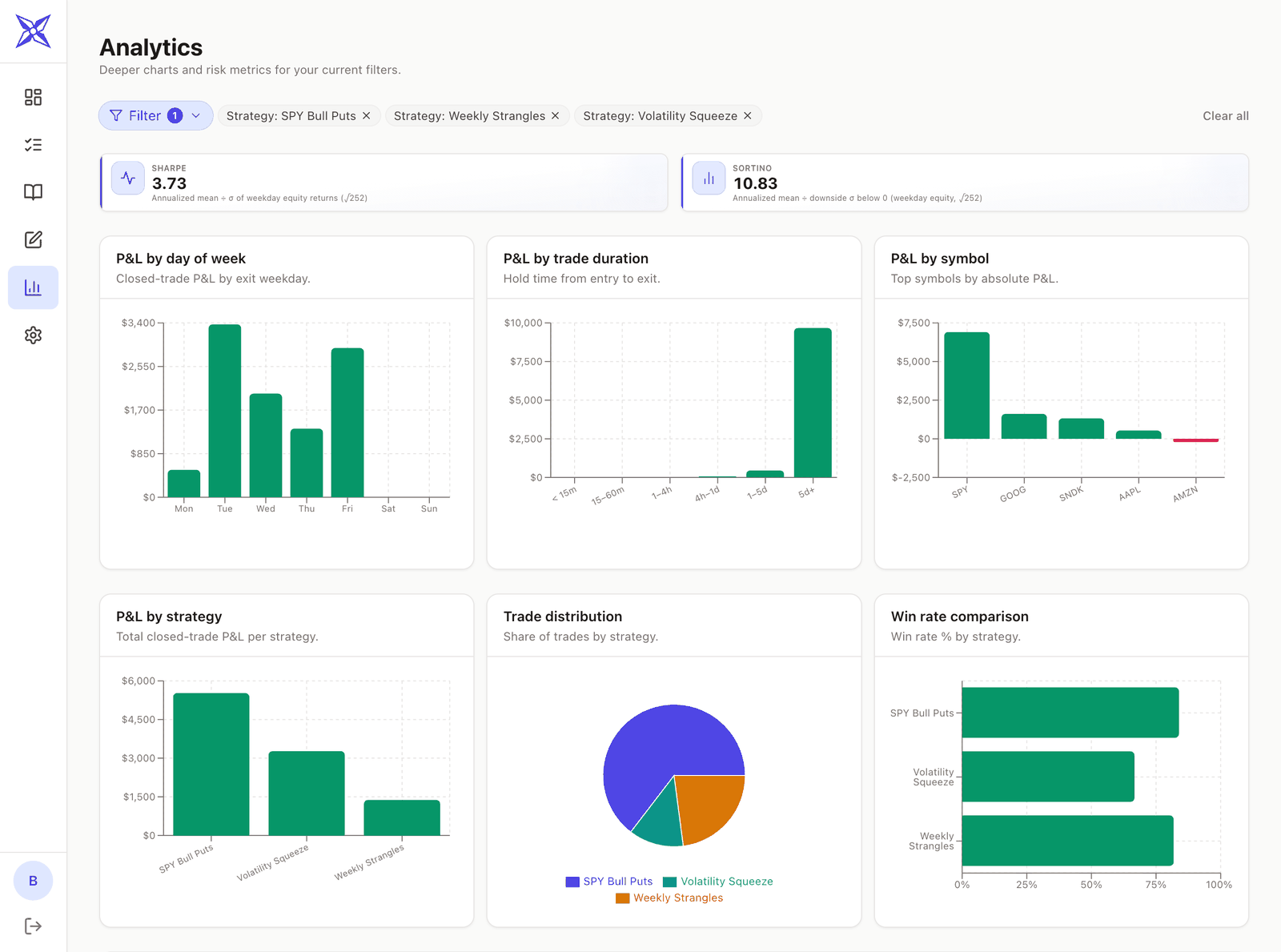
- P&L by strategy, symbol, day of week, and trade duration. Breakdowns that answer the question you should ask every month: where is the money actually coming from, and where is it leaking? A strategy with a negative total after fifty trades is a strategy to stop trading. A day of the week that is consistently red is a rule waiting to be written.
- P&L by time of day. Closed-trade P&L by the hour you entered, in your local time zone. Most traders have an hour that quietly pays for the others, and an hour, often the first or the last, where they give it back. For equities the 9 o'clock bar is the first half hour after the 9:30 open. If that bar is deep red and the 10 o'clock bar carries the week, you have found a rule: no entries in the first half hour.
- P&L by setup score. Average P&L per trade, grouped by how much of the checklist the trade met: under 25 percent, 25 to 49, 50 to 74, 75 to 99, and a full 100. A tile above it shows your average setup score across every scored trade. This is the chart that tells you whether your checklist is worth following. In a healthy journal the bars step up from left to right. If the 100 percent bar is not your best, either the criteria are wrong or you are not being honest when you tick them. Trades with no strategy or a strategy with no criteria are left out, so the chart only grades trades you meant to grade.
- P&L by session score. Average P&L per trade, grouped by the A to F grade you gave the day it closed. You are looking for a gap between A days and D days. This answers the question: When you follow your plan and execute well, are you profitable? If you break your rules and do not execute on your plan, do you lose money? Trades closed on days without a diary entry are excluded, which is one more reason to grade every day.
- Expectancy, Sharpe, Sortino, and the average win to average loss ratio for a fuller picture once you have enough trades for them to mean anything.

Use the filters. Slicing by ticker, strategy, side, result, or date range is where the answers live. Compare your longs to your shorts. Compare one strategy's R distribution to another's. Look at only your losers and read their MFE. Filter to one strategy and check whether its setup score chart still steps up; a checklist that predicts results for one setup and not another is telling you the second setup needs its own criteria.
A weekly routine that fits in thirty minutes
The daily loop, done right, takes ten minutes. Once a week, sit down with the dashboard and do the following.
- Filter to the past week. Read every loser's notes and tags. Sort them into "valid setup that failed" and "rule broken." The second pile is the one you can fix.
- Check the R-multiple distribution for anything worse than -1R. Each one needs an explanation.
- Compare winners' realized R to their MFE. If the gap is consistently large, adjust one thing about how you exit and test it next week.
- Read your diary scores next to the P&L calendar and the session score chart. Note which days you graded low and what you wrote that morning.
- Look at the setup score and time of day charts for the month, not just the week. A single week is too small a sample for either. If a low-score band or a specific hour is consistently red, that is your candidate rule.
- Evaluate and iterate in the coming week. This is the essence of data-driven improvement.
Frequently asked questions
Do I have to enter stops and targets on imported trades? No, but the R-multiple, MAE in R, and MFE in R all depend on a stop. Trades without one still show P&L, percentage MAE and MFE, and everything else. Adding the stop takes a few seconds and unlocks the most useful analysis in the app.
Where do I get the MAE and MFE prices? From your chart. After the trade closes, look at the low and high it printed between entry and exit and enter the worst and best prices. Most traders do this when they attach the exit screenshot, since they are looking at the chart anyway.
What if I scaled in or out? Import handles it. A trade with several entry and exit fills is one trade with legs, and P&L uses the volume-weighted average entry and exit, even when the fills arrive in separate imports. Manual trades can carry additional entries and exits too.
Why is the setup score chart empty? The score needs a strategy with at least one checklist criterion on the trade. Trades with no strategy, or a strategy whose checklist is empty, are not scored. Add a few criteria to your main strategies and the chart fills in from your next trade onward. You can also score past trades by opening them and ticking the criteria that were true.
Should I journal on days I did not trade? Yes, at least the Pre-Plan and a score. A day you sat out because conditions did not match your plan is an A. Recording it teaches you that not trading is a decision you can get right.
Can I export my data? Yes, at any time. Your trades are yours, and deleting your account removes them. EdgeDojo does not sell data or train AI on your trading history.
Start journaling
EdgeDojo is free during open beta, no card required, and accounts created during the beta keep free access when paid plans launch. Import your first statement, set your stops and targets, and your dashboard is a few minutes away. Join the free beta.
More trading journal
Trading journal
Perpetual Futures Trading Journal
A trading journal at its core tracks a few things: entries, exits, fees and P&L. Perpetual Futures are a newer financial instrument with several unique characteristics and properties: funding rates, leverage, etc. This guide covers what to record, how to size perp trades correctly, and how to import your perp trades seamlessly with our native Hyperliquid integration.
· 5 min read
Trading journal
What is a Trading Journal?
A trading journal is a record of every trade you take, along with the context around it: why you entered, where your stop and target were, how the trade behaved while it was open, and what you were thinking and feeling at the time. A journal shows you the data, and is a crucial tool for any serious trader who is trying to improve.
· 10 min read